
Vibe coding is a way of building software where you describe what you want in plain language and an AI writes the code for you. Instead of typing every line yourself, you steer the project with prompts, test what comes back, and ask the AI to fix or change things until it works.
The approach went from a single social media post in early 2025 to a mainstream workflow across startups, classrooms and big tech companies. Whether you have never written a line of code or you ship software for a living, it helps to understand what vibe coding actually does well and where it breaks down.
What is vibe coding?
At its simplest, vibe coding flips the usual relationship between a person and a code editor. Traditional programming asks you to translate an idea into exact syntax a computer understands. Vibe coding lets you keep working at the level of the idea while a large language model handles the syntax, file structure and boilerplate.
Computer scientist Simon Willison draws a useful line here. Using an AI assistant to help write code that you still read, test and understand is just AI-assisted programming. True vibe coding means accepting code you have not fully read and judging it mainly by whether the app behaves the way you wanted.
That distinction matters because the two habits carry very different risks, which we get into below.
Where the term came from
Former Tesla AI director and OpenAI co-founder Andrej Karpathy coined "vibe coding" in a post on X on February 2, 2025. He described building weekend projects by talking to an AI through voice input, barely touching the keyboard, accepting suggested changes without reading diffs, and pasting error messages straight back into the chat when something failed.
The phrase caught on fast because developers recognised the behaviour immediately. Within nine months, Collins Dictionary named "vibe coding" its 2025 Word of the Year after tracking a steep jump in usage across tech media and everyday conversation.
A year later, Karpathy himself suggested the industry was already moving toward a more disciplined version he called agentic engineering, where AI agents still write the code, but humans supervise architecture, testing and quality much more closely.
How vibe coding works, step by step
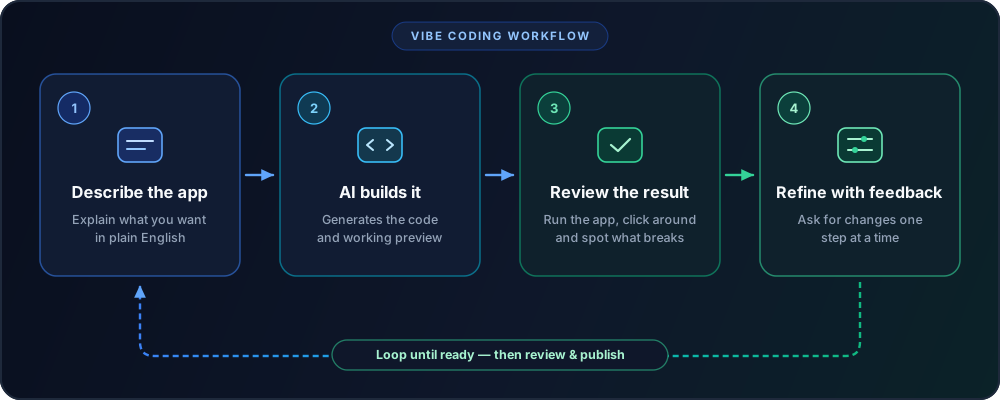
Most vibe coding sessions follow the same tight loop:
- Describe the goal. You tell the AI what you want to build, who it is for, and how it should look or behave.
- Let the AI generate a first version. The tool creates files, installs packages, writes frontend and backend code, and starts a preview.
- Run the app and inspect the result. Rather than reading every file first, you click around, test inputs and see what actually happens.
- Refine in plain English. You ask for changes one step at a time, or paste error messages back into the chat until the issue disappears.
You repeat that loop until the app does what you want. In practice, most of the work is not writing code. It is deciding what to ask next, spotting what broke, and checking whether the app behaves properly on edge cases.
A five-minute example
Say you want a small page that splits a restaurant bill between friends, including tip and tax. In a browser builder like Lovable, Bolt or Replit, your first prompt might be:
"Build a mobile-friendly bill splitter. Let me enter the subtotal, tax percentage, tip percentage, and number of people. Show what each person owes in large clear text, plus a reset button."
Within a minute, you have a working screen. Next you notice two problems: someone did not drink alcohol, and the currency defaults to dollars. So your second prompt says:
"Add an optional itemized mode where I can assign specific items to specific people, and let me switch currency."
Three or four rounds like that usually produce a clean personal tool that would have taken a beginner days to wire up by hand.
Vibe coding vs traditional coding vs no-code
Vibe coding sits neatly between visual no-code builders and hand-written software, though it gets confused with both.
| Approach | How you build | Flexibility | Learning curve | Best suited for |
|---|---|---|---|---|
| Traditional coding | Write source code directly | Full control over everything | High: months to years | Production systems, custom architecture, high security |
| No-code tools (Bubble, Webflow, Zapier) | Drag blocks and configure menus | Limited to platform features | Low to medium | Standard websites, forms, internal workflows |
| Vibe coding | Prompt an AI that generates real code | High because output is real code | Low to start, medium to finish well | Prototypes, personal tools, MVPs, UI experiments |
The big advantage over older no-code tools is that vibe coding produces actual source code — HTML, TypeScript, Python, SQL — that you can export, host anywhere, or hand to an engineer later. The trade-off is that real code can break in ways a locked-down drag-and-drop builder prevents.
The best vibe coding tools in 2026
Vibe coding tools now fall into three practical buckets depending on how comfortable you are with technical setup.
Browser app builders
If you want zero local setup, start here. You open a webpage, type a prompt, and see a live app preview side by side with the chat.
- Lovable focuses on turning plain-English prompts into full-stack web apps with clean interfaces, authentication and database wiring through Supabase.
- Bolt.new spins up full web projects directly in the browser and is fast for testing UI ideas and throwaway prototypes.
- Replit Agent combines code generation with built-in hosting, databases and deployment in one workspace, making it one of the easiest ways to publish a working link.
- Vercel v0 shines when your main goal is sharp frontend components, landing pages and React interfaces.
- Google AI Studio and Firebase Studio give strong free starting points inside Google's ecosystem, especially since the Google I/O 2026 AI announcements expanded agent features across developer tools.
AI code editors
Once projects grow past a few screens, dedicated editors give you far better control over files, version history and debugging.
- Cursor looks like Visual Studio Code, which most developers already know, and adds multi-file AI editing, codebase search and background agents.
- Windsurf offers a similar agent-driven editor experience aimed at keeping large projects coherent across many files.
- GitHub Copilot plugs straight into VS Code, JetBrains and GitHub repositories, making it an easy default for teams already on GitHub.
Command-line agents
Power users increasingly run coding agents straight from a terminal rather than a visual builder.
- Claude Code reads an entire local repository, edits multiple files, runs tests in your terminal and commits changes with your approval.
- OpenAI Codex handles parallel coding tasks, repo questions and pull-request workflows both locally and in the cloud.
If you are unsure which model ecosystem suits your day-to-day work outside coding as well, our ChatGPT vs Claude vs Gemini comparison breaks down how the major assistants differ.
Vibe coding tools compared
| Tool | Best for | Free tier | Paid plans start around |
|---|---|---|---|
| Lovable | Beginners building full-stack web MVPs | Yes: limited daily credits | $25/month |
| Bolt.new | Fast browser prototypes and UI mockups | Yes: limited token allowance | $20–$25/month |
| Replit | All-in-one build, database and instant hosting | Yes: starter tier | Core $20/month ($18 if billed yearly) |
| Cursor | Working in an AI-first code editor | Yes: Hobby plan, limited use | Pro $20/month |
| Claude Code | Multi-file terminal workflows on real repos | Included with paid Claude tiers | Claude Pro $20/month ($17 if billed yearly) |
| GitHub Copilot | Autocomplete and agent mode inside existing IDEs | Yes: 2,000 completions per month | Pro $10/month |
Pricing changes often across AI products; figures above were checked against vendor pricing pages in October 2026.
What vibe coding is good for
Used on the right problem, vibe coding saves a remarkable amount of time. In the 2025 Stack Overflow Developer Survey, 84% of respondents said they were already using or planning to use AI tools in their development workflow, largely for speed on repetitive tasks.
The clearest wins show up in four places:
- Throwaway prototypes and demos. Showing teammates or clients a clickable product in an afternoon beats writing a ten-page spec nobody reads.
- Personal tools and internal utilities. Calculators, CSV cleaners, habit trackers, simple dashboards and one-off scripts rarely justify hiring a developer, yet AI builds them well. They fit nicely alongside the broader AI tools saving hours every week across everyday admin work.
- Learning how software fits together. Asking an AI to explain the button, route or database query it just created is a gentler entry point than staring at a blank terminal.
- Frontend scaffolding for experienced engineers. Even senior developers often let AI draft forms, tables, test data and boilerplate so they can spend their energy on core logic.
Where vibe coding falls short
The honest catch is that getting to 80% of a working app feels effortless, while the final 20% can get messy fast.
That sentiment shows up clearly in developer data too. In the same Stack Overflow survey, positive favourability toward AI tools dipped from above 70% in earlier years to 60%, and 46% of developers said they actively distrust the accuracy of AI output. Most developers still keep AI away from high-stakes deployment and security decisions.
Security risks are real
AI models optimise for making your prompt work right now, not necessarily for making it safe on the public internet. In a 2025 benchmark across more than 100 models, security firm Veracode found that 45% of AI-generated code tasks introduced known security flaws, including weak cross-site scripting and log-injection handling.
Typical beginner mistakes with vibe-coded apps look painfully ordinary:
- API keys pasted into frontend code where anyone opening browser dev tools can steal them.
- Database tables left readable or editable by any logged-in user because row-level permissions were skipped.
- Login, billing or file-upload logic that works on the happy path and fails quietly on malicious input.
The debugging trap
The second wall hits once a project reaches a few thousand lines of code you have never read. Asking an AI to fix Bug A often breaks Feature B because neither you nor the model holds a clean mental map of the whole app.
Costs can creep up at the same point. Repeating "still broken, fix it" burns paid credits quickly without moving forward.
Vibe coding vs agentic engineering
This gap explains why experienced builders treat pure vibe coding as a prototyping mode rather than a whole engineering method. With a prototype, speed matters most. With software other people rely on or pay for, someone still needs to review diffs, write tests, lock down secrets and understand the data model — even while Big Tech pours hundreds of billions into AI to automate more of the job.
How to start vibe coding safely
If you want to build your first project this weekend without painting yourself into a corner, keep the workflow simple:
- Pick one tiny problem. A single-purpose tool — a study flashcard app, workout timer, invoice generator, reading tracker — works far better than "build me a marketplace."
- Write down the rules before prompting. List the screens, inputs and outputs in five bullet points first. Good structure beats clever wording; the habits behind a solid AI prompt formula apply directly here.
- Ask for one feature at a time. Build the core screen first, test it, then add saving data, then polish styling. Huge all-in-one prompts create tangled code.
- Save checkpoints constantly. Use built-in version history or Git commits after every working step so one bad edit cannot ruin an hour of progress.
- Keep secrets out of prompts and frontend files. Store API keys in environment variables, and never paste real customer data or private credentials into chat windows unless you know how the tool handles privacy — or run models locally using on-device AI tools when privacy comes first.
- Do a sanity pass before sharing publicly. If an app touches logins, payments or personal data, get a developer to review authentication, database permissions and rate limits before real users arrive.
Frequently asked questions
Do you need coding experience to vibe code?
No — beginners build working personal tools and prototypes all the time without knowing syntax. Basic familiarity with how web pages, databases and environment variables work becomes helpful as soon as you want to publish an app for other people.
Is vibe coding free?
You can start for free on most platforms, including Google AI Studio, GitHub Copilot's free tier, Replit, Bolt and Lovable's daily credit plans. Heavy building or deploying custom domains usually pushes you onto a $10 to $25 monthly plan.
What programming languages work best for vibe coding?
JavaScript, TypeScript, HTML/CSS and Python work best because AI models have seen enormous amounts of public training code and mature frameworks in those languages. Most browser app builders default to React, TypeScript and Tailwind CSS automatically.
Can you build a real business with vibe coding?
You can validate demand and build an early minimum viable product quickly, and many solo founders do. Before charging customers or storing sensitive data, plan on proper security review, automated tests and clean version control rather than pure prompt-and-pray edits.
Is vibe coding safe?
For local scripts, mockups and personal utilities, yes. For public apps handling logins, payments or user data, raw AI-generated code often misses permissions and input validation, so human security checks remain essential.
Will vibe coding replace software developers?
It changes what developers spend time on rather than removing the need for engineering judgment. Writing routine boilerplate gets much faster, while architecture, security, debugging complex systems and product decisions matter more.