
AI tools for students can explain difficult concepts, summarise reading, organise notes, find research sources and create practice questions. The best choice depends on what you need: ChatGPT or Claude for explanations, Perplexity for source-led research, NotebookLM for studying your own documents, Quizlet for flashcards and Grammarly for writing feedback. Several offer free access, so you can build a useful study system without paying for every app.
Prices and free-plan limits can change, and some features vary by country or account. The comparisons below are based on official product documentation and published reviews, not hands-on testing by Scrolltek. Check the provider's current plan details before subscribing.
1. Quick List: Best AI Tools for Students
| Tool | Best for | Free plan | Paid price |
|---|---|---|---|
| ChatGPT | Explanations, practice questions and study planning | Yes, with usage limits on some features | Plus: US$20/month |
| Notion | Organised notes, tasks and study dashboards | Yes; AI use is limited | Plus is free for eligible students and educators; broader AI features are on Business and Enterprise |
| Perplexity | Research and finding cited web sources | Yes | Pro: US$20/month; education pricing may be available |
| Quizlet | Flashcards and structured revision | Limited free access | Quizlet Plus: US$35.99/year; Plus Unlimited: US$44.99/year on the displayed annual plans |
| Grammarly | Grammar, clarity and writing feedback | Yes | Pro: US$12/month billed annually, or US$30 month-to-month |
| Claude | Detailed explanations and working with long documents | Yes, with usage limits | Pro: US$20/month, or US$200 billed annually |
| Gemini | Explanations and work across Google's tools | Yes, with limits | Google AI Pro: US$19.99/month on the US plan |
| NotebookLM | Questions and study guides grounded in your sources | Yes, with usage limits | Higher limits are available through eligible Google AI plans |
Prices are in US dollars and reflect official US-facing pages available for this guide. Taxes, local pricing, eligibility and plan features may differ. Notion AI is not unlimited on its free plan; its pricing page lists limited AI trial usage for Free and Plus, with broader AI features on Business and Enterprise.
Quick recommendation: Start with ChatGPT for tutoring, NotebookLM for course materials, Perplexity for research and Quizlet for retrieval practice. Add Notion or Grammarly only if you need their particular features.
2. The Best AI Tools for Students
ChatGPT: Best all-round study assistant
ChatGPT can explain concepts, generate practice questions, help plan revision and analyse uploaded documents when those features are available to your account. It works best as an interactive tutor rather than an answer machine.
Best for: Understanding unfamiliar topics, working through problems, generating quizzes and planning a study week.
Pros
- Can explain a topic at different levels of difficulty.
- Supports follow-up questions and step-by-step learning.
- Can help turn learning objectives into practice questions and revision schedules.
Cons
- Can produce confident but incorrect explanations or calculations.
- Free access to some tools and models is limited.
- An explanation is not a substitute for checking your textbook, lecturer's notes or required reading.
How to use it: Ask it to teach one concept, give you a problem to solve independently, and assess your reasoning after you submit an attempt. For a broader comparison of assistants, read our ChatGPT vs Claude vs Gemini comparison.
Notion AI: Best for organising study materials
Notion combines notes, databases, tasks and project planning. Its AI features can help edit documents, summarise information and work with material stored in a workspace, but AI access depends on your plan.
Best for: Students managing several subjects, deadlines, reading lists and group projects.
Pros
- Keeps notes, assignments and revision tasks together.
- Databases can organise topics, deadlines and unfinished work.
- Eligible students and educators can receive a free Plus plan.
Cons
- AI features on Free and Plus are limited to complimentary trial usage.
- Setting up a complicated workspace can become a distraction.
- It is not a replacement for a dedicated flashcard review routine.
How to use it: Create one page per course, with sections for lecture notes, questions you cannot answer, important dates and revision tasks. Keep the system simple enough to maintain throughout the semester, rather than turning note storage into a full-time project — a common trap with second brain apps.
Perplexity: Best for research and source discovery
Perplexity searches the web and presents answers with citations, making it useful when you need to locate relevant articles, background information and primary sources. Its free plan includes basic searches and citations, with limits on advanced features.
Best for: Starting research, exploring unfamiliar topics and finding sources to read in full.
Pros
- Provides citations that help you trace claims.
- Makes it easier to discover relevant sources and follow research leads.
- Can help you narrow a broad subject into a more focused question.
Cons
- A citation does not guarantee that a claim is correct or that the source supports it.
- Search results may miss important scholarship or favour readily available material.
- Some advanced searches and models require a paid plan.
How to use it: Ask for sources from academic journals, universities or official organisations. Open the original documents, verify the authors and publication details, and cite the material you actually read rather than relying only on the AI summary.
Quizlet: Best for flashcards and revision
Quizlet offers digital flashcards and learning activities that help you practise remembering definitions, concepts and facts. Its AI-supported features and usage limits depend on the current plan.
Best for: Vocabulary, terminology, formulas, dates and concise question-and-answer revision.
Pros
- Makes repeated recall practice convenient.
- Lets you organise study material into sets.
- Can support short revision sessions between classes.
Cons
- Some learning features and textbook solutions are paid or limited.
- Incorrect cards can reinforce misunderstandings.
- Recognising an answer on a card is not the same as explaining a concept independently.
How to use it: Make cards that ask one clear question at a time. Include a short explanation or example on the answer side, and review difficult cards more often. Check generated cards against your course materials before studying them.
Grammarly: Best for writing feedback
Grammarly checks grammar, spelling and clarity, with additional rewriting and generative features on paid plans. It can help you notice language problems without taking over the thinking behind an assignment.
Best for: Essays, reports, emails and students writing in English as an additional language.
Pros
- Highlights grammar and spelling problems.
- Helps improve sentence clarity and tone.
- The free plan covers basic writing assistance.
Cons
- Suggestions can change your intended meaning.
- Polished language does not make an argument accurate or well supported.
- Paid features may be unnecessary if you mainly need spelling corrections.
How to use it: Write your own argument first. Review suggestions one by one, keep the ones that improve clarity and reject changes that make your work less precise or less like your own voice.
Claude: Best for detailed explanations and document work
Claude can help explain difficult material, analyse documents and develop a structured line of reasoning. It offers a free plan and paid options, with usage limits that vary by plan.
Best for: Breaking down dense readings, comparing arguments and asking follow-up questions about complex topics.
Pros
- Useful for exploring a concept through several connected questions.
- Can help organise a long reading into themes and questions.
- Supports a tutoring workflow based on discussion rather than immediate answers.
Cons
- It can still make factual errors or misread a source.
- Free usage is limited.
- You should not assume that a long, fluent explanation is comprehensive.
How to use it: Supply an authorised reading or a section of your notes. Ask for the author's main claim, supporting evidence, assumptions and two questions you should be able to answer after reading.
Gemini: Best for students already using Google tools
Gemini can assist with explanations, research and work connected to Google's productivity ecosystem. The available models, limits and integrations depend on your account and plan.
Best for: Students who organise their work in Google Docs, Drive and other Google services.
Pros
- Offers a free starting point.
- Paid Google AI plans provide higher usage and additional features.
- Can fit into a workflow that already uses Google's tools.
Cons
- Features and availability vary by region and account.
- AI-generated information still requires verification.
- A subscription may overlap with tools you already pay for.
How to use it: Ask for an explanation or revision questions based on your course objectives, then check the result against your notes. If you use connected documents, confirm that the correct file was referenced.
NotebookLM: Best for studying your own sources
NotebookLM is designed to help you work with supplied sources. Depending on the supported file type and current limits, you can ask questions about uploaded material and generate study aids from it.
Best for: Lecture notes, reading packs, research papers and revision based on a defined set of documents.
Pros
- Keeps study questions connected to your supplied material.
- Helps you compare themes across several sources.
- Offers a useful starting point for summaries and revision questions.
Cons
- It cannot make missing or poor source material reliable.
- Its answers may omit context or misinterpret a passage.
- Usage limits apply, and you should confirm what the cited passages actually say.
How to use it: Add the lecture notes or readings you are permitted to upload. Ask a question, inspect the supporting passage and explain the answer in your own words. For sensitive or restricted material, check your institution's rules before uploading it.
3. Study Prompts You Can Copy
A good prompt specifies the subject, the source material, the level of difficulty and the type of help you want. These are reusable prompt templates, not claims of benchmark testing. Replace the bracketed details with your own information.
Prompt 1: Summarise without losing the important details
Use only the notes I provide to summarise [topic] for a student studying at [course or level]. Organise the summary into the main ideas, key terms, supporting evidence and points I should verify. Mark anything the notes do not establish. Finish with five questions I should answer without looking at the summary.
Prompt 2: Create a retrieval-practice quiz
Act as a tutor for [subject]. Use my notes to ask me 10 questions, one at a time, mixing definitions, applications and explanations. Do not show the answer before I attempt each question. After each response, explain what I got right, what I missed and how to improve my reasoning. Do not introduce unsupported facts.
Prompt 3: Explain a difficult concept
Explain [concept] at my current level: [level]. Start with a plain-language explanation, then give a concrete example and a more technical explanation. Identify common misconceptions and ask me one question that tests whether I truly understand the concept. Wait for my answer before continuing.
Prompt 4: Check my understanding of a reading
Based on the passage below, identify the author's main claim, the evidence used, important assumptions and any limitations. Separate what the author explicitly states from your interpretation. Point me to the relevant passages and finish with three questions that test my understanding.
Prompt 5: Build a realistic revision plan
My exam on [subject] is on [date]. I can study for [minutes] per day on [available days]. My topics are [list], and my confidence levels are [high, medium or low for each]. Build a realistic plan that prioritises weak areas, includes retrieval practice and revisiting difficult material, and leaves time for timed practice and rest. Do not assume I have already mastered any topic.
For more ways to structure clear requests, see our guide to the AI prompt formula for better answers.
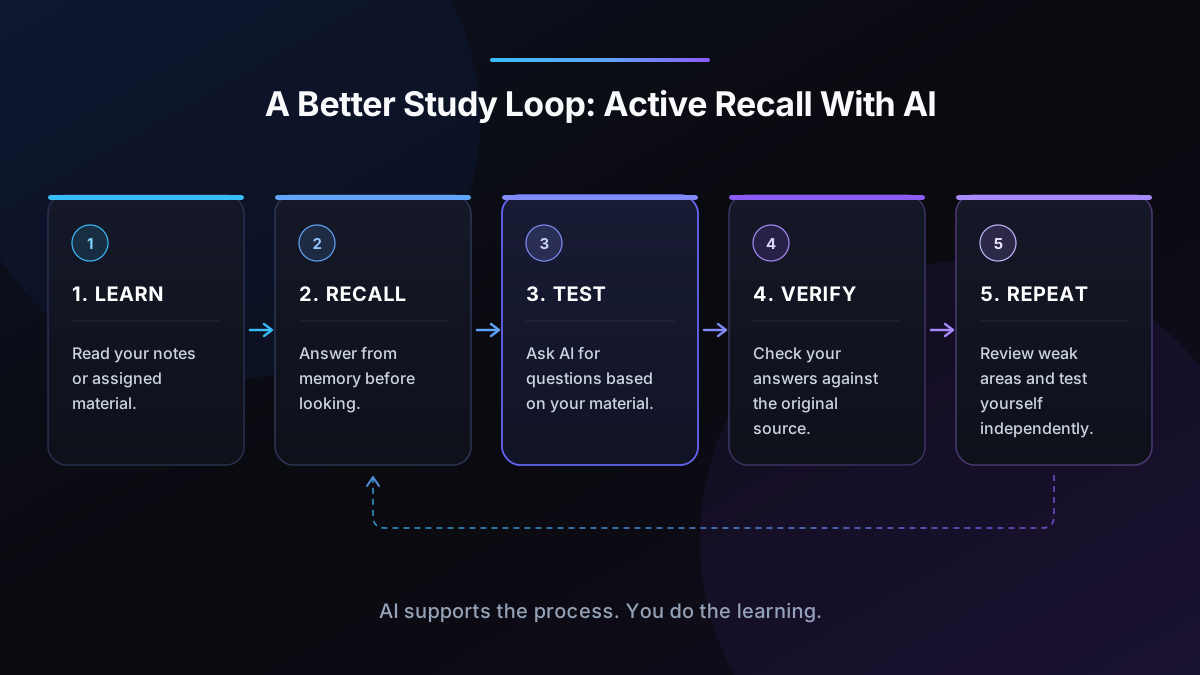
4. A Study Workflow That Works: Active Recall With AI
Active recall means trying to retrieve information from memory before looking at the answer. AI can help you practise it, but the important part is making the attempt yourself.
Step 1: Learn from the original material
Read your lecture notes, textbook or assigned reading first. Use an AI tool to clarify confusing points, but keep the course material as your reference.
Step 2: Close the notes and recall
Write down what you remember, explain the concept aloud or answer questions without looking. It is fine to get things wrong: the attempt reveals what you need to review.
Step 3: Ask AI to test you
Request questions based on the material. Tell the assistant to ask one question at a time and wait for your response before revealing the answer.
Step 4: Check and correct your mistakes
Compare your answer with the original source. Identify whether the problem was a missing fact, a misunderstanding, a weak explanation or an inability to apply the concept.
Step 5: Return to difficult material
Make flashcards for concise facts and schedule another attempt at the questions you missed. Revisit the material later rather than relying on one long session.
Step 6: Test yourself without AI
Finish with a short, closed-book explanation or practice exercise. You should be able to use the knowledge when the assistant is unavailable and during an assessment where AI is not allowed.
The key principle is simple: use AI to create opportunities to retrieve and apply knowledge, not to replace the retrieval itself.
5. How to Use AI Without Cheating or Becoming Dependent
AI policies differ between schools, universities, courses and individual assignments. Some instructors allow brainstorming or language feedback but prohibit generated answers; others set different conditions. Read the relevant policy and ask your instructor when the rules are unclear.
Use these safeguards:
- Keep the thinking yours. Use AI to clarify, question and critique your ideas. Do not submit AI-written work as your own.
- Follow assignment rules. Permission to use AI for one task does not automatically mean it is permitted for another.
- Verify important claims. Check quotations, calculations, references and factual statements against original sources.
- Be transparent when required. Follow your institution's rules for acknowledging or documenting AI assistance.
- Protect private information. Do not upload personal records, unpublished research, exam questions or restricted course material without permission.
- Practise independently. Try solving problems before asking for worked explanations, and test yourself without assistance afterward.
Avoid asking AI to produce a finished assignment that you intend to pass off as entirely your own. A better request is to review your outline, identify gaps in your argument or ask questions that help you improve a draft you wrote yourself.
Also watch for dependence. If every reading becomes an AI summary and every problem becomes an AI solution, you may feel familiar with the material without being able to recall or apply it. Build independent practice into every study session.
6. Free vs Paid: What Is Worth Paying For?
Most students should start with free plans and pay only when a specific limitation repeatedly interferes with studying.
Stay free if you need occasional explanations, basic writing feedback or research discovery. ChatGPT, Claude, Gemini, Perplexity and Grammarly all provide free entry points, although their usage limits and features differ.
Consider paying if you use one tool regularly and know exactly why. A paid plan might be worthwhile if you frequently need higher usage limits, advanced research features or particular integrations. Compare the total cost with your actual workload before subscribing.
Check student eligibility first. Notion offers an eligible student and educator benefit for its Plus plan, while Perplexity lists Education Pro pricing subject to verification. Eligibility and availability may vary.
Avoid paying twice for the same job. If one assistant already handles explanations and planning well, you may not need a second general-purpose chatbot; see our guide to AI tools saving hours every week for a look at which everyday tools earn their place. Add a specialist tool when it solves a distinct problem, such as organised flashcard practice or grammar feedback.
Before you pay, check the current price, renewal period, cancellation conditions, local availability and feature limits on the official pricing page. A feature shown in a product demonstration may not be included in the free plan.
7. Best Picks by Need
STEM: mathematics, computing and science
Start with ChatGPT, Claude or Gemini to explore explanations and practise problem-solving. Ask the assistant to explain each step and then give you a similar problem to solve independently. Check equations, units, code and scientific claims against reliable course materials.
For laboratory work, calculations or safety-related material, follow your instructor's procedures and authoritative references. An AI explanation should not override a required method.
Languages and non-native English speakers
Use ChatGPT or Claude to practise conversation, explore vocabulary and request explanations of grammar. Grammarly can help you identify writing problems, while a flashcard tool can reinforce new words.
Ask for corrections with explanations rather than simply requesting a rewritten paragraph. Try producing the sentence yourself first, then compare the feedback with your original meaning.
Medicine and health sciences
Use NotebookLM to study authorised lecture notes and readings, and use a general assistant to quiz you on terminology or explain concepts. Verify every important answer against prescribed textbooks, current clinical guidance and course materials.
AI output is not a substitute for clinical supervision or authoritative medical references. Never upload identifiable patient information or restricted records without explicit authorisation.
Law and policy
Use Perplexity to discover primary sources, then read the legislation, judgment, regulation or official document directly. A chatbot can help compare arguments or explain unfamiliar terms, but it may confuse jurisdictions, omit later developments or misstate legal authorities.
Check the relevant jurisdiction and date. Cite sources you have personally verified and follow your institution's rules on AI use.
Students with many notes and readings
NotebookLM is a strong starting point when your study depends on a defined collection of sources. Notion is useful if your larger challenge is keeping notes, assignments and deadlines organised.
Do not build a complicated system before you have a study routine. A simple folder of course materials, a list of weak topics and regular recall practice may be enough.
8. Frequently Asked Questions
Is using AI to study cheating?
Not automatically. Using AI to clarify a concept, generate practice questions or organise revision may be permitted, but the rules depend on your school, instructor and assignment. Submitting AI-generated work as your own can violate academic integrity requirements. Check your course policy and disclose assistance when required.
What is the best free AI tool for students?
There is no single best option for every student. ChatGPT or Claude can help explain concepts, Perplexity can support source discovery, NotebookLM can work with supplied readings and Grammarly can check basic writing. Start with the tool that addresses your main study problem and confirm its current free-plan limits.
Which AI tool is best for note-taking?
NotebookLM is useful for asking questions about a collection of supplied readings, while Notion can organise notes alongside tasks and deadlines. Neither replaces checking your original sources. Choose based on whether your priority is understanding documents or managing a long-term study workspace.
Can AI make flashcards?
Yes. General-purpose assistants can draft question-and-answer cards from notes, and Quizlet provides dedicated flashcard and learning features. Check every card for accuracy, especially formulas, dates and definitions. Good cards test one clear idea and require you to retrieve the answer rather than simply recognise it.
Do I need to pay for AI study tools?
Usually not when you are starting. Free plans can cover basic explanations, research discovery, writing feedback and some revision tasks. Pay only when you repeatedly hit a meaningful limit or need a specific paid feature. Check the current price and cancellation terms before subscribing.
Can AI help if English is my second language?
Yes. You can ask an assistant to explain vocabulary, compare sentence structures, practise conversations or give feedback on a paragraph you wrote. Ask it to explain the reason for each correction so you learn the underlying rule. Check that suggested edits preserve your intended meaning and follow your course's AI policy.
9. Conclusion: Build a Study System, Not an App Collection
The best AI tools for students are the ones that help you understand material, practise retrieving it and improve your work without taking over the learning process. Start with one general assistant, add NotebookLM if you study from many documents, and use Quizlet or another flashcard method when regular recall practice would help.
You do not need a paid subscription to begin. Choose a tool, test it against your real coursework, verify its answers and keep independent practice at the centre of your routine.
Which AI study tool has helped you most, and what do you use it for? Share your experience with Scrolltek's readers.